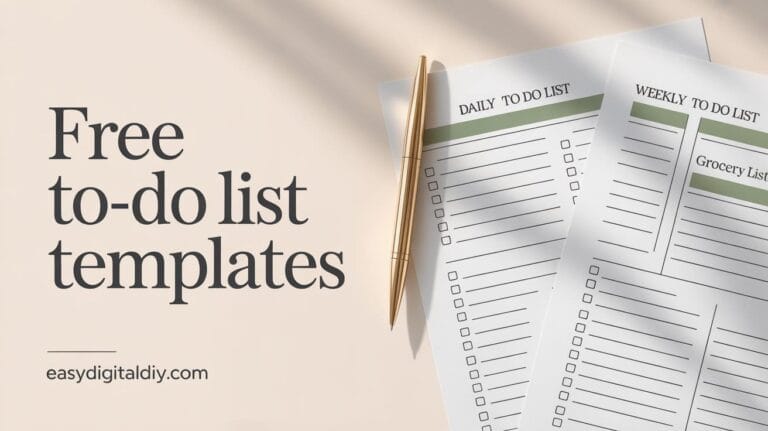
Free Weekly Planner Printable PDF — Download Your Free Weekly Planner
If you’ve been searching for a weekly planner that’s simple, clean, and actually easy to use (not one that makes you feel behind before you even start), you’re in the right place. This post includes a free printable weekly planner you can download near the bottom—plus practical tips to plan your week with less stress and more focus.
A weekly planner is basically your “week at a glance” home base. It’s where you decide what matters most, when you’ll do it, and what you can safely ignore for now. And the best part? You don’t need a fancy system or a perfect routine. You just need one page that helps you see your week clearly.
In this guide, I’ll walk you through:
What a weekly planner is (and what it isn’t)
Why weekly planning works so well for productivity and stress
What’s inside this free weekly planner PDF
How to use it in real life (work, study, meals, fitness)
Printable vs digital planning (and why paper still wins for many people)
Preview ideas for different styles of weekly planner printables
A download section near the bottom (for scroll depth)
FAQs people actually ask before printing
Let’s make planning feel simple again.

What Is a Weekly Planner?
A weekly planner is a template (paper or digital) that helps you map out your week—Monday through Sunday—so you can organize tasks, appointments, priorities, and reminders in one place.
Instead of planning day-by-day with no big picture, weekly planning gives you the full view:
What’s happening this week?
What needs to get done?
What’s the one thing I shouldn’t forget?
Weekly planner use cases (work, study, meals, fitness)
A weekly planner is flexible, which is why it works for so many goals:
Work planning: deadlines, meetings, weekly goals, admin tasks, content calendar blocks.
Study planning: assignment due dates, reading sessions, revision blocks, exam countdown.
Meal planning: grocery reminders, prep days, “busy-night dinners,” leftovers schedule.
Fitness planning: planned workouts, rest days, step goals, meal or hydration notes.
Home/life admin: bills, errands, cleaning routine, family plans, appointments.
Even if your life is messy (and whose isn’t?), a weekly planner turns chaos into a simple list of next steps.
Why Use a Weekly Planner?
People usually start weekly planning for productivity… and stay for the peace of mind.
Here are the biggest benefits (and they’re real-life benefits, not “perfect person” benefits):
Better focus: When your week is on paper, you stop trying to hold everything in your head.
Improved productivity: You waste less time deciding what to do next.
Habit tracking: You can attach small weekly habits to your plan (even simple checkboxes).
Stress reduction: Planning reduces last-minute scrambling because you’re not surprised by your own schedule.
Planning vs reacting
Without a weekly planner, you’re reacting all week:
urgent messages
random requests
low-energy days
“Oh no, I forgot…”
With a weekly plan, you’re leading your week:
you choose priorities
you choose your pace
you give yourself time buffers
Also, planning doesn’t mean doing more. It means doing what matters and letting the rest wait.
Why a printable weekly planner is so effective
There’s something about paper planning that works differently for many people:
it’s visible (no app to open)
it’s distraction-free (no notifications)
it feels more intentional (you wrote it down)
Many people prefer this simple tactile approach because it helps them stay focused.
What’s Inside This Free Weekly Planner PDF
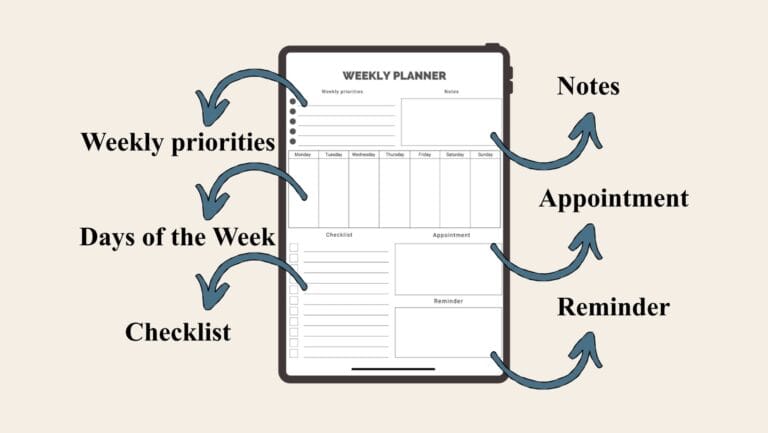
This free weekly planner is designed to be clean and usable—so it works for students, busy parents, freelancers, and anyone who wants a simple structure. The layout includes: week overview boxes for Monday through Sunday, a checklist, weekly priorities, notes, and dedicated spaces for appointment and reminder.
Here’s a breakdown of the sections you’ll see inside the weekly planner PDF:
Week overview (Monday–Sunday)
You get seven daily columns/boxes:
Monday
Tuesday
Wednesday
Thursday
Friday
Saturday
Sunday
Use these boxes for:
top tasks per day
time blocks (morning/afternoon/evening)
theme days (admin day, workout day, errands day)
Weekly priorities
This is the part that makes the weekly planner powerful. The template includes a “Weekly priorities” area where you list what matters most this week.
Good weekly priorities are:
small enough to finish
clear and specific
connected to your bigger goals
Example weekly priorities:
Finish client project draft
Work out 3 times
Meal prep on Sunday
Submit assignment by Thursday
Notes (brain dump space)
The “Notes” section is where you catch everything else—ideas, things you need to remember, stuff you don’t want to lose.
This prevents the planner from becoming messy in your daily boxes.
Checklist
The checklist section is for tasks that don’t need a specific day (but must happen this week).
Think:
buy printer ink
call the doctor
send invoice
clean fridge
renew subscription
Appointment
The appointment box is useful for “fixed time” items that must happen at a specific moment.
Put things here like:
dentist 3:00 PM
Zoom meeting 10:30 AM
school pickup
Reminder
The reminder box is for important small things you don’t want to forget.
Examples:
take medication
bring documents
pay bill
pack gym shoes
This is also a great space for a weekly “focus reminder” like:
“Done is better than perfect.”
“Minimum effort still counts.”
How to Use Your Weekly Planner Effectively
Let’s make this easy. Weekly planning should take 10–20 minutes, not an hour.
Here’s a simple step-by-step system that works for most people.
Step 1: Pick your planning day
Choose one day to plan your week:
Sunday evening (classic)
Monday morning (fresh start)
Friday afternoon (finish strong)
Consistency matters more than which day you pick.
Step 2: Fill in appointments first
Start with anything that’s fixed:
meetings
classes
family events
deadlines
Put them into the daily boxes and/or your appointment section. This keeps your schedule realistic.
Step 3: Choose 3 weekly priorities (max)
Use the weekly priorities area and choose your “big three.”
This one step prevents overload. If everything is a priority, nothing is.
Step 4: Add 1–3 tasks per day
Now fill the Monday–Sunday boxes.
Rule of thumb:
Weekdays: 2–3 tasks max
Weekend: 1–2 tasks max (unless you truly want a busy weekend)
If you pack every day with 10 tasks, your weekly planner becomes a weekly guilt list.
Step 5: Put “floating tasks” in the checklist
Use the checklist for tasks that can happen any day.
This reduces stress because you don’t have to guess the exact day you’ll feel like doing it.
Step 6: Use notes for your brain dump
Use notes for:
ideas
small reminders
things you might do “if you have time”
Step 7: Do a 3-minute daily check-in
Each morning (or the night before), look at the plan and do one quick edit:
move a task to another day if needed
add one new task
delete something that’s not important
Your weekly planner is allowed to change. That’s normal.
Examples you can copy (work, fitness, study)
Here are three real examples to help you picture how to use this weekly planner printable.
Example 1: Work schedule (freelancer or remote work)
Weekly priorities:
Finish landing page copy
Record 2 short videos
Send invoices
Daily boxes:
Mon: Plan content + write draft
Tue: Client calls + revisions
Wed: Record videos
Thu: Edit + schedule posts
Fri: Admin + invoices
Sat: Rest / light catch-up
Sun: Plan next week
Checklist:
Update portfolio
Reply to emails
Backup files
Reminder:
“No multitasking during deep work.”
Example 2: Fitness week (simple and realistic)
Weekly priorities:
3 workouts
8k steps most days
Grocery shop once
Daily boxes:
Mon: 30-min workout
Tue: Walk + stretch
Wed: Workout
Thu: Walk + mobility
Fri: Workout
Sat: Fun activity
Sun: Meal prep + plan
Checklist:
Wash gym clothes
Fill water bottle
Buy protein snacks
Reminder:
“Minimum effort counts.”
Example 3: Study plan (student)
Weekly priorities:
Finish chapters 3–5
Submit assignment
Practice quiz 2 times
Daily boxes:
Mon: Chapter 3 notes
Tue: Chapter 4 notes
Wed: Assignment draft
Thu: Edit + submit
Fri: Practice quiz
Sat: Chapter 5 notes
Sun: Practice quiz + plan next week
Checklist:
Print readings
Email professor question
Appointment:
Library study session
Printable Planner vs Digital Planner
Digital planners and apps are convenient—especially for reminders and syncing across devices. But printable planners still have a strong advantage for many people: focus.
Pros of a printable weekly planner
No notifications, fewer distractions
You can see your whole week at a glance
It’s easy to personalize with handwriting
It feels satisfying to check things off
Paper planning also tends to be more mindful and can help with memory and focus compared to typing for some users.
Pros of digital planning
Quick edits
Automatic reminders
Easy repeating tasks
Sharing calendars with others
Best approach (my honest opinion)
If you love digital calendars, keep them for appointments. Then use your weekly planner printable for priorities, tasks, and focus. That combo works beautifully for busy schedules.
Frequently Asked Questions About Weekly Planners
Can I print it at home?
Yes. This weekly planner PDF is designed to be printed at home on common paper sizes like A4 or US Letter.
Is it good for work planning?
Yes. The layout supports weekly priorities, a checklist, appointments, and daily planning boxes—perfect for work tasks and deadlines.
Can I use it digitally?
You can import the weekly planner PDF into a note app and write on it with a stylus, but it’s designed primarily as a printable planner.
Is it compatible with tablets?
Yes, as a PDF you can typically use it on tablets with PDF annotation apps, but the main experience is paper planning.
Is it free forever?
This printable is free on this site at the time of publishing. (If you later update the download method, you can keep it free by email signup.)
What if my week changes a lot?
That’s exactly why the checklist and notes sections are helpful. Keep daily boxes for “must-do” items and put flexible tasks in the checklist.
How do I avoid overplanning?
Limit yourself to 3 weekly priorities and 1–3 tasks per day. Your planner should guide you, not pressure you.
Download Your Free Weekly Planner Printable PDF
You can grab the weekly planner printable pdf free download here.

Printing instructions (A4 & US Letter)
This weekly planner is provided as a PDF file.
For best results:
Print on A4 or US Letter
Choose “Fit to page” (or “Scale to fit”) in your printer settings
Print in black & white to save ink
Tip: Print a few copies at once and keep them in a binder or clipboard
PERSONAL USE ONLY (Mandatory Disclaimer)
This free weekly planner printable PDF is for PERSONAL USE ONLY.
Redistribution, resale, or commercial use is strictly prohibited.
If someone asks you for it, please share this blog post link instead of sharing the file.
Explore More Free Planning Resources
You may also find these resources helpful:
- Free Trackers & Habit Tracking Printables
- Free Digital Planners & Printable Planner PDFs
- Free Digital Journals & Printable Journal PDFs
- Goal Planners and Productivity Tools
These tools are designed to support organization and clarity in daily